How to Become a Daraz Seller in Bangladesh: Registration, Fees & Growth
Learn how to become a Daraz seller in Bangladesh, register an account, list products, understand fees, manage orders, and grow…
 by Sheikh Ornob

Learn how bKash merchant accounts work, what documents you need, and how shops and online sellers in Bangladesh accept payments.
Cash is familiar, but your buyer’s phone is already in their hand. A bKash merchant account turns that habit into a formal checkout path. It gives your shop a cleaner way to collect, trace, and confirm payments.
For small businesses in Bangladesh, that matters. bKash has a huge user base, yet many sellers still depend on personal transfers, screenshots, or cash at delivery. This guide explains registration, payment acceptance, gateway options, and the checks you should make before you start.
A bKash merchant account is a business collection account. It lets customers pay your shop or online business through bKash instead of sending money to a personal number. That difference matters for order tracking, customer trust, and cleaner records.
The official bKash merchant page lists facilities such as the bKash Merchant App, Merchant QR, counter payment, 24/7 payment collection, and transaction history. In plain English, it gives your business a payment identity customers can recognize.
A merchant account turns bKash from a personal money tool into a business checkout channel.
That doesn’t mean every shop needs the same setup. A pharmacy in Khulna, a boutique in Dhaka, and a subscription-based service team won’t use bKash the same way. The account choice should match how customers order, pay, and ask for receipts.
A merchant account makes the most sense when payment collection is already part of your daily business rhythm. If you collect from walk-in customers, delivery buyers, students, patients, members, or subscribers, you need a payment channel that staff can repeat without improvising every time.
The wrong fit is just as important. If you sell once a month to friends, a full merchant setup may be more process than you need. If you take dozens of orders each week, the structure starts paying for itself through fewer mistakes and faster checking.
bKash now has more than one business style option. The standard merchant account is the cleaner route for licensed shops and formal online businesses. The Personal Retail Account, often called PRA, is aimed at micro and small retailers, including f-commerce sellers.
| Option | Best fit | Key requirement | What to watch |
|---|---|---|---|
| bKash Merchant Account | Licensed shops, online stores, service providers, and larger sellers | Valid trade license and business details | Confirm fees, settlement, and gateway access |
| Personal Retail Account | Micro retailers and small f-commerce sellers | NID, unused mobile number tied to the NID, and proof of SIM ownership | Limits apply, including BDT 30,000 per payment receive and BDT 500,000 monthly receive on the public PRA page |
| Personal bKash Account | Individual personal transactions | Personal identity documents | Don’t use it for formal business collection |
Think of it like shop signage. A handwritten note can work for a roadside stall, but a registered counter needs a proper signboard. Your payment setup should signal the same level of seriousness as the business you’re building.
A lot of Bangladesh’s online selling starts before the paperwork feels complete. Maybe you’re testing a product through Facebook, taking preorders on WhatsApp, or selling from home. That doesn’t make the payment question disappear. It just changes the account path you should consider.
bKash says small businesses without a trade license may open a personal retail account. The PRA page lists required documents such as your NID, a valid unused mobile number registered against that NID, proof of SIM ownership, and nominee NID if applicable. It also says PRA users can collect payments through QR, gateway, or USSD routes, with limits applying.
Use PRA as a starting structure, not as an excuse to avoid formalization forever. When sales become steady, a trade license, tax records, bank account, and formal merchant setup make the business easier to defend, finance, and scale. Yeah, paperwork is annoying. Disorder is more expensive.
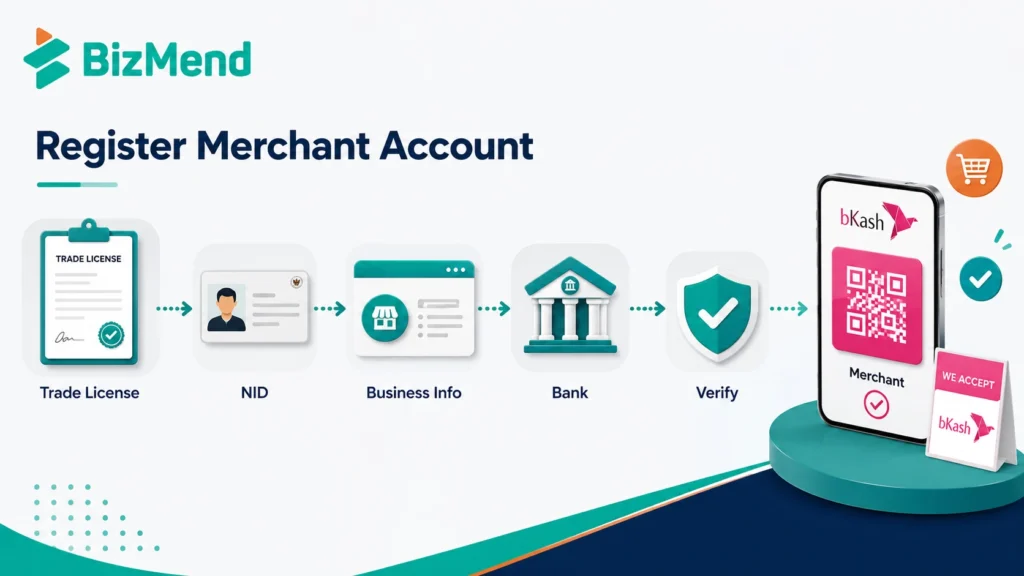
Before you start bKash merchant registration, gather the basics. The official merchant form asks whether you have an NID, a valid trade license, and a bank account. It also asks for the trade license number and expiry date when the license field applies.
If you’re too early for a trade license, don’t force the standard merchant path. bKash’s online business page says businesses without a trade license may open a personal retail account. That’s a useful bridge for very small sellers, but you still need to respect its limits.
The official route starts with the bKash merchant sign-up form. You submit your business details, then bKash says it will contact you after verifying the information. There isn’t a single public promise that every business will be approved in a fixed number of days.
Before submitting, compare every form field with your actual documents. Small mismatches can slow the follow-up call, especially if the shop name, license spelling, owner name, or phone number doesn’t line up. Treat the form like a bank account application, not a casual interest form.
For online businesses, the flow is slightly different after approval. bKash says existing merchant account holders can sign up for the bKash Business Dashboard. That dashboard is the more relevant route when you want online payment management rather than only counter collection.
If more than one person handles payments, decide who owns the relationship with bKash. Keep that person’s phone, email, and business documents current. A shared inbox also helps, because gateway notices and settlement questions shouldn’t sit inside one employee’s private email.
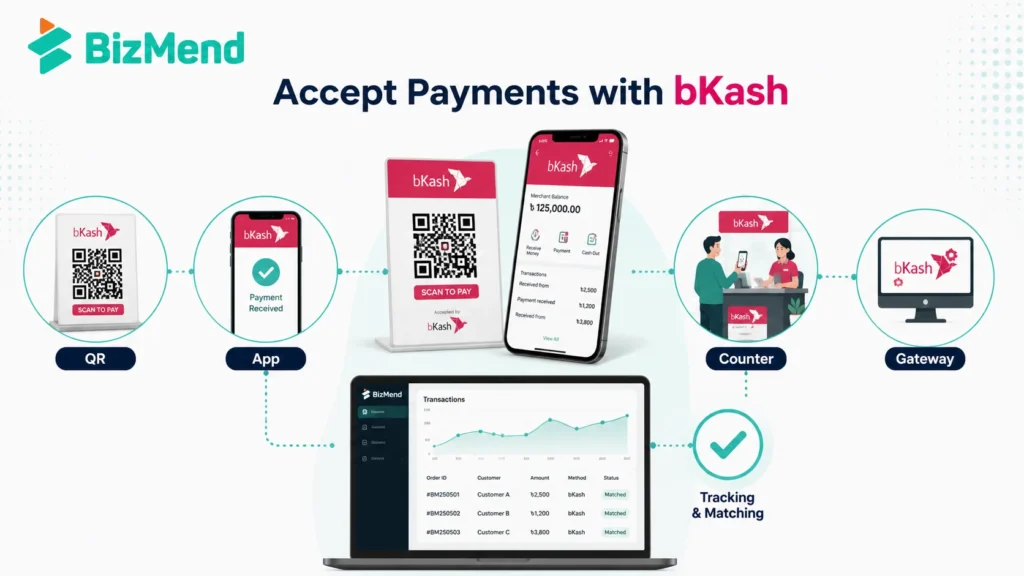
Once approved, your job isn’t finished. You still need to decide how customers will pay. A physical counter, Facebook inbox, delivery order, and website checkout each need a slightly different payment habit.
Train your team to check the transaction ID, amount, sender details, and time before releasing goods. This is basic, but it prevents a lot of messy disputes. Payment confirmation should be a counter habit, not a manager-only task.
The bKash payment gateway is for online payment acceptance. It helps customers pay through bKash from a website, app, or online checkout flow. For a serious online seller, that is cleaner than asking customers to send money manually and paste a transaction ID.
bKash’s payment page says its secure payment gateway provides payment services to merchants and organizations. Its PGW terms also mention tokenized checkout, where the customer’s bKash account can be linked with a merchant-maintained customer ID for later payments.
Manual transaction ID checking can work at small volumes. At scale, it becomes a bookkeeping tax.
If you run WooCommerce or Shopify through a local layer, a custom Laravel site, or a mobile app, involve a developer early. Ask bKash which production credentials, callback URLs, dashboard access, and settlement reports you will receive. Don’t build checkout around guesswork.
Accepting payment is only half the job. Matching payment to the correct customer, order, branch, or invoice is what keeps the business sane. This is where many small teams struggle after the first busy week.
| Payment situation | Record to keep | Why it helps |
|---|---|---|
| Shop counter sale | Receipt number, amount, transaction ID, and cashier name | It lets you check the day’s cash, card, and bKash collections without argument |
| Facebook order | Order number, customer phone, bKash transaction ID, and delivery status | It stops one screenshot from being matched to the wrong delivery |
| Website checkout | Order ID, gateway payment ID, callback status, and final invoice status | It helps your developer and accounts team spot failed or duplicate attempts |
| Service payment | Client name, service date, amount, and reference note | It connects the money to the actual work your team delivered |
Keep the system simple enough for a busy Friday. If your payment log needs ten fields and three approvals for a BDT 500 order, staff will skip it. Start with the few records you truly need, then add more only when volume demands it.
This is where many sellers get too casual. Public bKash pages show some charges and limits, especially for personal retail accounts, but the standard merchant account pricing is not presented as one simple universal table. Ask for the current terms before you launch.
| Question | Why it matters | What to ask bKash |
|---|---|---|
| Merchant discount rate or service charge | It affects margin on every sale | What fee applies to my account type, QR payments, and payment gateway transactions? |
| Settlement timing | It affects cash flow and supplier payments | When does collected money become available, and does bank settlement follow a schedule? |
| Transaction limits | It affects large orders and busy sales days | What per transaction, daily, and monthly limits apply to my business category? |
| Refund or failed payment handling | It affects customer support | How are held, failed, cancelled, or reversed payments reported? |
| Gateway credentials | It affects website launch timing | Who receives sandbox and production access, and what testing is required? |
For PRA, bKash’s public page lists BDT 30,000 per transaction for payment received, BDT 30,000 daily payment received, and BDT 500,000 monthly payment received. It also says customer payment received is free under a promotional offer running until further notice. Check the live page before relying on it.
Payment acceptance is partly technical, but most of the daily work is operational. If your cashier, delivery team, and accounts person don’t follow the same rules, bKash collection can still become confusing.
This is the unglamorous part, but it’s where payment systems become reliable. The tool matters. The routine matters more.
Digital payment trust is fragile. A customer may love bKash but still hesitate if your payment instruction looks unclear. Your goal is to make the payer confident that the money is going to the right business and the right order.
For online checkout, make the success page and failure page clear. If payment is pending, say “pending.” If the order is unpaid, say it’s unpaid. Vague messages create support pressure, and support pressure turns into refund fights.
The first mistake is using a personal number for business collection because it feels faster. It may work for a few orders, but it gets messy when customers ask for proof, staff change, or your volume grows.
The fix is boring in the best way. Keep documents current, train staff, verify payments inside official channels, and review your settlement records. That’s how a payment method becomes a business system that can survive busy days.
A bKash merchant account can make customer payment collection cleaner, especially in Bangladesh’s app, QR, and f-commerce-heavy market. Start with the right account type, verify the current fees and limits, then build a simple routine for staff and records. The account is only the door. Your process decides whether it actually helps the business.
You can receive personal transfers in a personal account, but that isn’t the right setup for formal business payment collection. A merchant account or personal retail account gives you a clearer payment identity, better tracking, and a more suitable route for customer checkout.
The official bKash merchant form asks whether you have a valid trade license and asks for the license number and expiry date. If you don’t have one, bKash’s online business page points small sellers toward the Personal Retail Account option.
The bKash payment gateway is used for online checkout through a website, app, marketplace, or digital order flow. It helps match payments to orders more cleanly than manual transaction ID collection, especially when order volume grows.
bKash’s public merchant page says you submit the form and bKash contacts you after verifying the information. It doesn’t publish one fixed approval timeline for every business, so treat timing as a verification-dependent process.
Don’t assume that. bKash publishes some PRA charges and says PGW dynamic charges may apply based on the understanding between the merchant and bKash. Ask for the current rate, settlement terms, and any gateway-related charges before launching.

Learn how to become a Daraz seller in Bangladesh, register an account, list products, understand fees, manage orders, and grow…
by Sheikh Ornob
Compare the cost of living in Bangladesh in 2026, including Dhaka and Chittagong rent, food, transport, utilities, inflation, and monthly…
by Sheikh Ornob
Learn MoA and AoA requirements in Bangladesh, key clauses, drafting basics, RJSC filing steps, amendments, and common company-registration mistakes. Suggested…
by Sheikh Ornob