

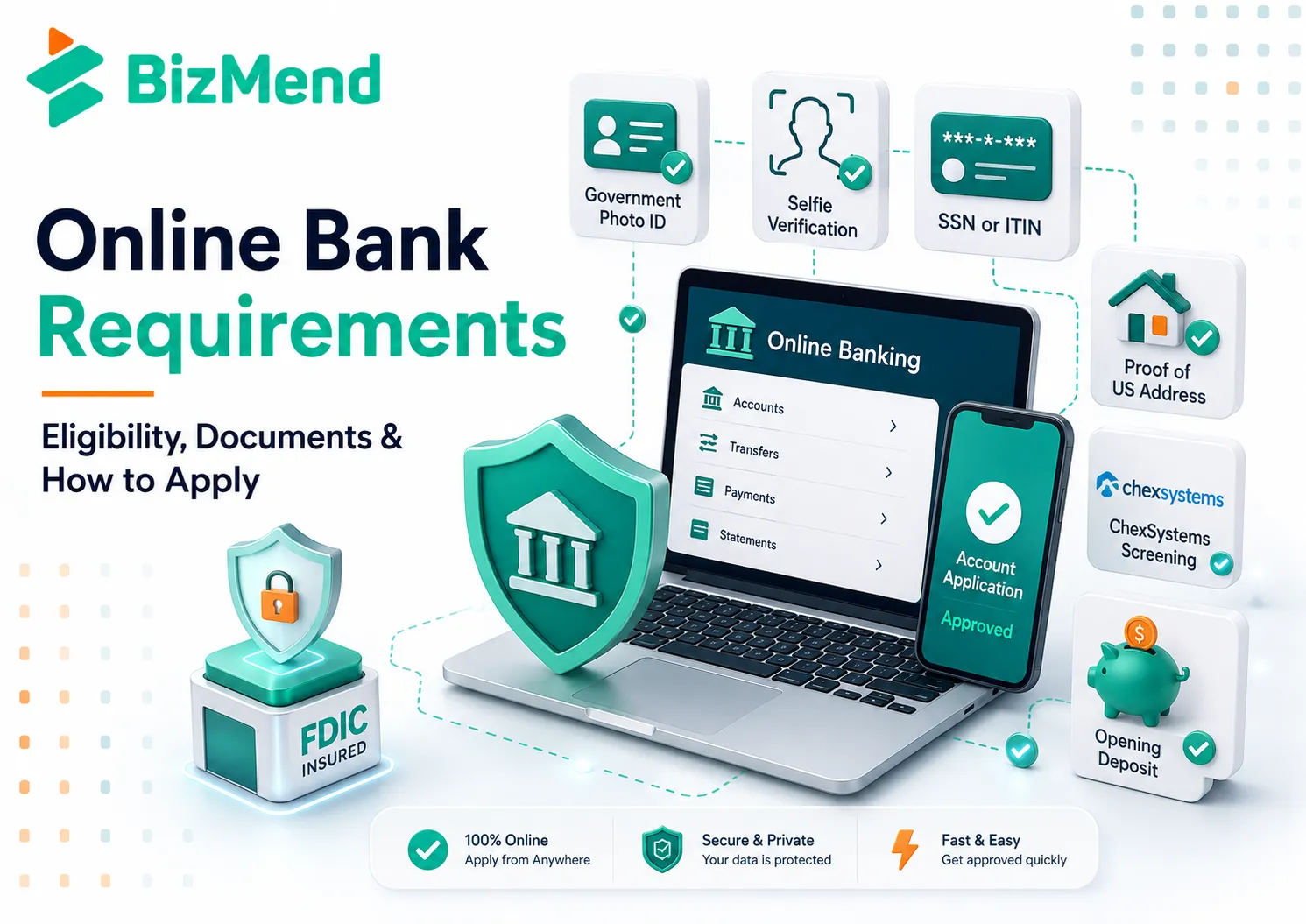
Online bank requirements come down to the same four checks any US bank uses: proof of who you are, proof of where you live, a taxpayer number, and a banking history clean enough to pass a screening report, all collected through a screen instead of a counter. Skipping the branch changes how you prove these things, not what you actually need to prove in the end.
This guide lists the exact eligibility rules, the documents to bring, the application steps in order, and the reasons applications get rejected, so nothing catches you off guard mid-application.
Quick Answer: To meet online bank requirements, you generally need to be 18 or have a joint adult owner, a government-issued photo ID, a US address, and a Social Security number or ITIN, and pass a ChexSystems screening. Most online banks also ask for a small opening deposit, often $0 to $100.
Online Bank Requirements: Eligibility Checklist
Age. Opening an account alone generally requires being 18 or the age of majority in your state, since minors cannot enter a binding contract on their own. Interagency guidance from federal banking regulators confirms no federal law sets this age; state contract law does, which is why every online bank asks for a parent or guardian to serve as a joint owner or custodian on a minor’s account, the same rule that applies at a community bank or any branch-based institution. For background on what actually makes a bank an online bank in the first place, this online bank guide covers the classification this checklist assumes.
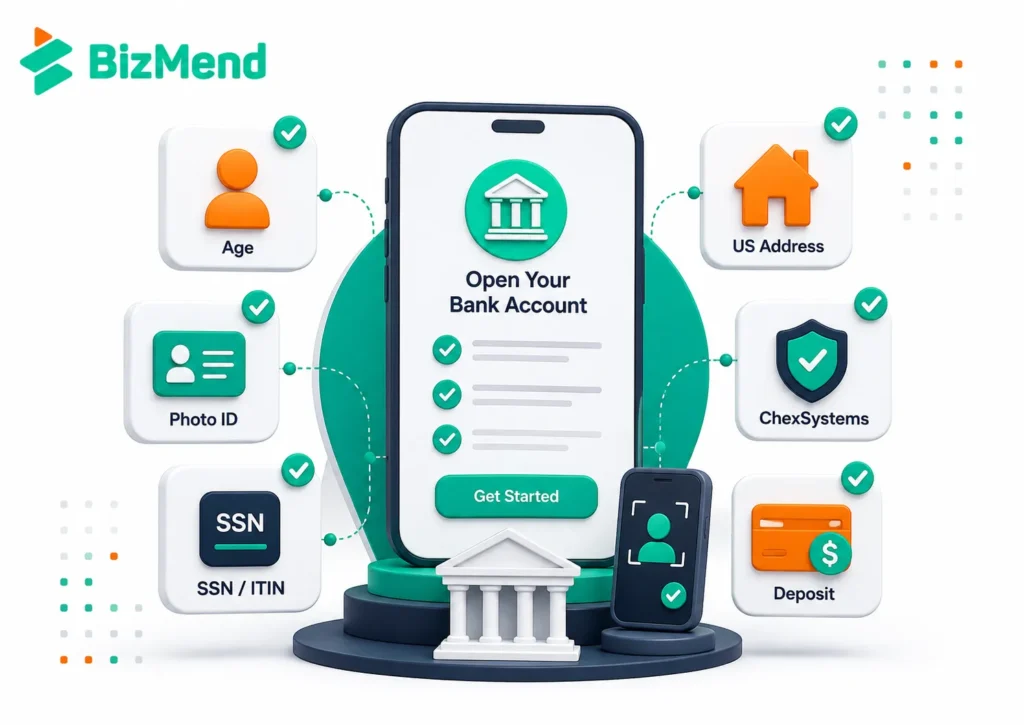
Identification. An online bank needs a current government-issued photo ID, such as a driver’s license, a state ID card, a passport, or a military ID, uploaded as a photo through the app rather than handed across a counter to a teller. A live selfie or short video is often required too, matched against the ID photo to confirm you are the person in the picture rather than someone using a stolen document.
Taxpayer number. Federal customer identification rules require every bank to collect a taxpayer identification number before opening an account, and an online bank is no exception just because the process happens on a screen. US citizens and most residents use a Social Security number; non-citizens without one can generally use an Individual Taxpayer Identification Number instead.
Screening check. Most online banks review a ChexSystems report, a specialty consumer file tracking past account problems such as unpaid overdrafts or suspected fraud, kept entirely separately from your credit score.
Opening deposit. An online bank typically asks for a small minimum deposit to activate the account, commonly $0 to $100, since lower overhead often means the bank does not need the deposit to offset branch costs the way a traditional bank sometimes does. A device with a working camera and a stable internet connection is the other practical requirement, since the entire application, including identity verification, happens through it rather than at a counter.
Documents Needed to Open an Online Bank Account
Each document an online bank asks for maps to a specific legal or risk requirement, not a random preference, even though the entire process happens on a screen.
A government-issued photo ID, such as a driver’s license, state ID, passport, or military ID, confirms your identity and satisfies the bank’s federal customer identification obligations. Most online banks pair this with a live selfie captured through the app’s camera, using facial-matching software to confirm the person applying matches the photo on the ID, a step a branch-based bank replaces with a teller’s visual check. A Social Security card or ITIN letter documents the taxpayer number the bank must collect, though many online banks accept the number typed directly into the app once your ID confirms your identity, so the physical card is rarely required. Proof of a US address, such as a lease, a recent utility bill, or a piece of official mail, matters most when your ID shows an old or out-of-state address, since the bank needs a current mailing address on file for statements, a physical debit card, and legally required notices.
Business applicants add formation documents and an Employer Identification Number, and an online bank’s business account may also ask for a linked personal account or an existing business bank statement to verify operating history. Reviewing the national bank requirements checklist alongside this list is useful for founders comparing an online bank against a larger traditional alternative before applying. Comparing the identity documents above against what a state bank would ask at a branch confirms that the underlying paperwork barely changes; only the verification method does.
Step-by-Step Process to Open an Online Bank Account
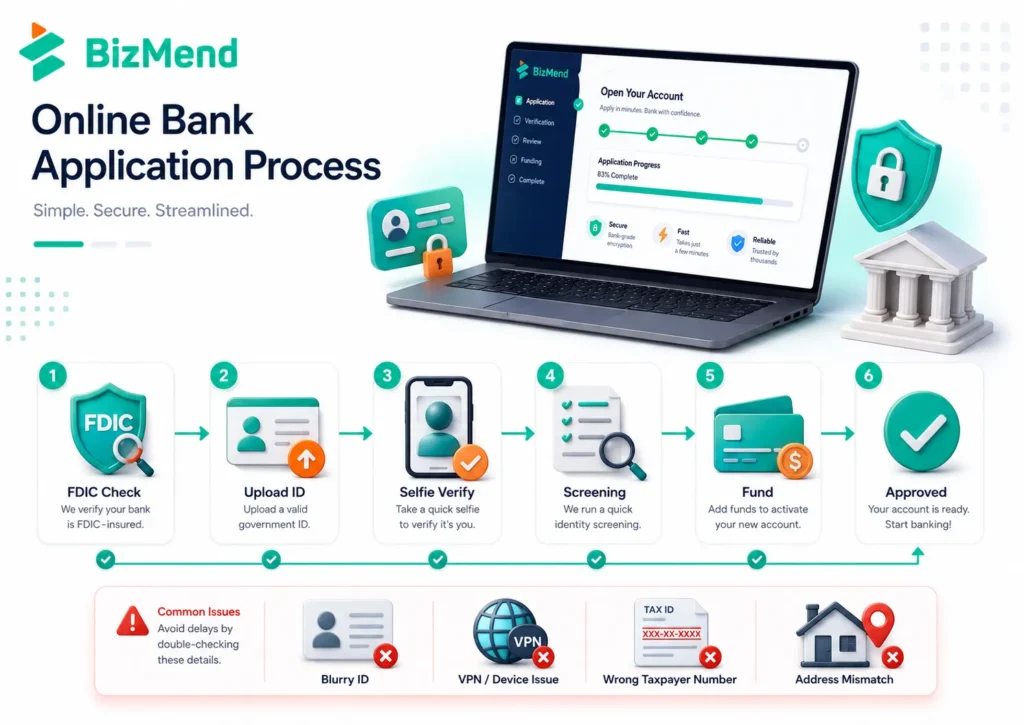
1. Confirm the bank is FDIC-insured and identify who actually holds the deposits. Search the FDIC’s BankFind tool for the bank’s name, not just the app’s brand, since some online banking apps are technology companies partnered with a separate chartered bank behind the scenes.
2. Download the app or start the application on the website. Choose checking, savings, or both, since document and minimum-deposit rules can differ slightly by product.
3. Verify your identity. Photograph a government-issued ID, complete a live selfie or short video, and enter your Social Security number or ITIN; most online banks complete this step in a few minutes if the photos are clear, well lit, and free of glare from a phone screen or overhead light.
4. Provide your address and consent to the ChexSystems screening. The bank pulls this report automatically once you submit the application, checking for unpaid overdrafts, a forced account closure, or suspected fraud tied to your name at another bank.
5. Fund the account. Link an existing bank account for a transfer, use a debit card, or mail a check, since most online banks cannot accept a cash deposit directly the way a branch teller could.
6. Wait for approval. Online applications with a clean ChexSystems record and clear identity photos are often approved within minutes, though some applications route to manual review and take longer.
7. Set up account access. Activate the mobile app fully, order a physical debit card if the bank offers one, and confirm how to reach support before you close the app.
Working through the same steps used when choosing a national bank applies here too, since the underlying document and funding requirements stay similar whether the bank has branches or not.
Common Reasons Online Bank Applications Get Rejected
A negative ChexSystems record causes most denials. Unpaid overdrafts, a forced account closure, or suspected fraud on a past account can trigger a rejection even when your credit score is fine, since ChexSystems tracks banking history separately from credit history entirely.
A failed identity verification is the second common cause, and it shows up more at an online bank than a branch. Blurry ID photos, poor lighting during the live selfie, or a name that does not match your Social Security records exactly can all stall or reject an application that a human teller might have resolved on the spot with a second look.
Insufficient proof of a US address trips up newcomers most often. Someone exploring a non-resident bank account may not yet have a utility bill in their own name, so a lease agreement or a bank-accepted alternative document usually solves this.
An incomplete or mistyped taxpayer number also stalls approval. Double-checking your Social Security number or ITIN before you apply avoids a delay that a few minutes of review can prevent, since online systems check the number against government records automatically.
Unusual account activity signals, such as applying from a VPN, a device the bank cannot verify, or an IP address that does not match your stated address, can also trigger extra fraud review at an online bank specifically, since it lacks the in-person cues a branch employee would otherwise use to judge a customer. To avoid a denial, apply from your own device on a stable connection, use good lighting for the identity photos, and confirm your details match your official records exactly.
What Happens After You Apply
Many online bank applications are approved within minutes when the ChexSystems record is clean and the identity photos are clear, faster in many cases than a branch-based bank that still needs to key in paperwork by hand. An application flagged for manual review, often triggered by a document that did not scan clearly or a detail needing a second look, can take one to three business days to clear instead.
If approved, the bank activates online access immediately in most cases, issues account and routing numbers right away, and mails a physical debit card that typically arrives within seven to ten business days, with some online banks offering a virtual card for immediate use while the physical one is in transit. If denied, federal rules require the bank to send an adverse action notice naming the screening company involved, and you can request a free copy of that report to dispute anything inaccurate.
Trying a regional bank is worth considering if a specific online bank cannot approve your application. The state bank requirements checklist is also worth reviewing, since the underlying documents rarely change much from one bank to the next once the actual issue behind the denial is resolved.
Key Insights
- Four requirements cover most applicants: ID, taxpayer number, US address, and a passable ChexSystems record.
- Identity verification happens through a photo ID and a live selfie instead of a teller’s visual check.
- ChexSystems, not your credit score, causes most online bank application denials.
- Non-citizens can generally use an ITIN instead of a Social Security number to apply.
- A denied applicant has a federal right to a free copy of the report that caused it.
- Opening deposits are often $0 to $100, lower than many branch-based accounts require.
Final Thoughts
Online bank requirements rarely surprise anyone who checks eligibility first: an age of 18 or a joint owner, a current photo ID, a Social Security number or ITIN, a US address, and a ChexSystems record clean enough to pass review. Applying with all five ready, plus a working camera, usually means an approved account within a few minutes rather than a branch visit.
If a bank does turn down the application, request the adverse action notice, promptly pull the free report it points to, and fix whatever specifically caused the denial before trying again elsewhere. Clear identity photos and a stable internet connection prevent most of the online-specific delays that a branch application would never encounter in the first place.
Frequently Asked Questions
What do I need to open an online bank account?
You generally need a government-issued photo ID, a Social Security number or ITIN, proof of a US address, and a passable ChexSystems record. Most online banks also require a small opening deposit and a live selfie to verify your identity remotely, plus a device with a working camera.
Can I open an online bank account without an SSN?
Yes, in most cases. Non-citizens without a Social Security number can generally use an Individual Taxpayer Identification Number instead, since federal rules require a taxpayer number but not specifically an SSN for every applicant, provided a valid photo ID is still presented.
What is the minimum deposit for an online bank account?
It varies by bank and account type, but many online banks require $0 to $100 to open the account, often lower than a typical branch-based bank because of reduced overhead costs. Confirm the current figure directly with the specific bank before applying.
How long does it take to open an online bank account?
Many online applications with a clean ChexSystems record and clear identity photos are approved within minutes. Applications flagged for manual identity review, often triggered by a blurry photo or a mismatched detail, can take one to three business days to fully clear instead.
What is ChexSystems and why does it matter?
ChexSystems is a specialty consumer reporting agency that tracks past banking problems, such as unpaid overdrafts or suspected fraud, separately from your credit score. Most online banks review this report before approving a new account, and a negative record is the most common reason applications are denied.
